Build applications.
Not plumbing.

AppMaker is a visual full-stack development environment. Design the UI visually, then go as deep as you want with JavaScript, SQL, APIs and server-side logic. The database, authentication and jobs are already part of the project. AI assistance is on its way.

Start building

AppMaker is in beta. Free to use. Export a standard Node.js application and host it anywhere.

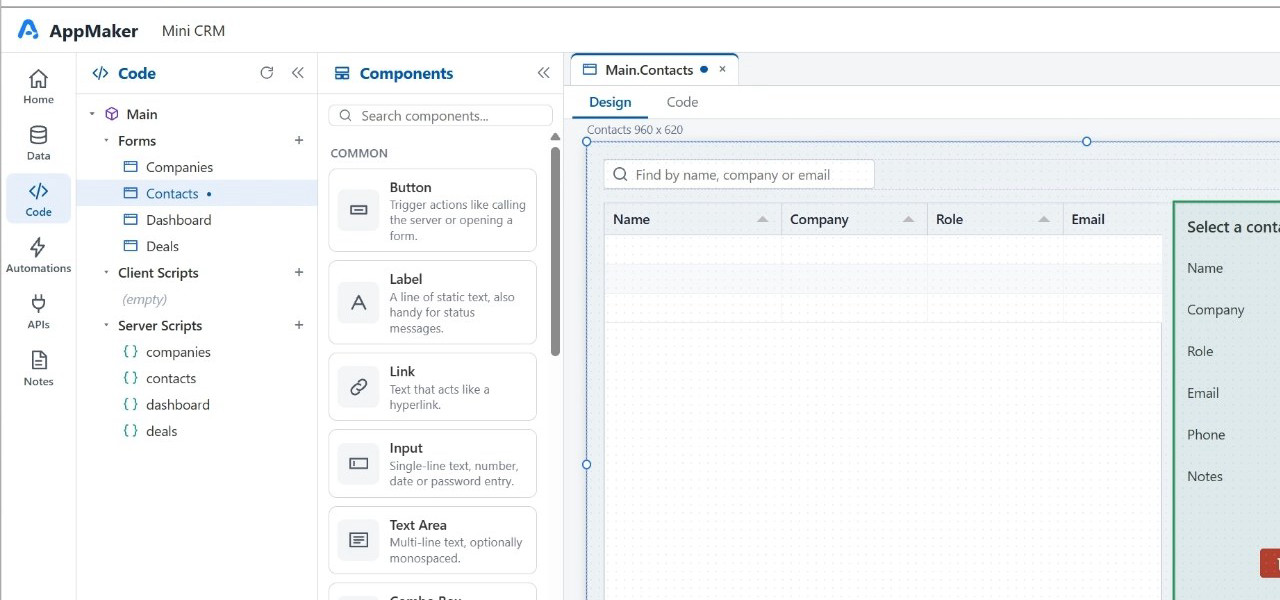
The AppMaker Designer with the Contacts form open, the component palette on the left and the property inspector on the right
  • Free to use
  • Fully programmable
  • Built-in database
  • Exportable Node.js apps
  • Host anywhere

See AppMaker in 60 seconds

Open a project, design a form, wire it to data, write a little JavaScript, run it.

Visual when it helps.
Code when you need it.

Compose the interface with the form designer. Then write ordinary JavaScript on the client and on the server, query the database with SQL, call external APIs or expose your own. The designer is a head start, never a ceiling.

  • Form designer

    Lay out forms and controls visually. Bind a grid to a server-script function in one property.

  • Client JavaScript

    Handle events, validate input, call the server. Standard language, standard tooling.

  • Server JavaScript and SQL

    Run logic close to the data. Query the built-in database, call services, return results.

  • APIs in and out

    Consume third-party APIs from the client or server, and expose your own endpoints.

The client and server JavaScript API shown here is in active development and may change during the beta.

One project. The whole stack.

An AppMaker application is not a folder of arbitrary files. It is a structured model of forms, scripts, data, APIs and jobs that the designer, the runtime, and AI all understand.

Application
  1. FormsScreens the user sees
  2. ControlsGrids, inputs, charts, tabs
  3. Client JavaScriptBehaviour in the browser
  4. Server JavaScriptLogic next to the data. Feeds forms and grids
  5. DatabaseBuilt in. Tables, SQL, migrations
  6. APIsEndpoints you expose and services you call
  7. AuthenticationUsers, roles, sessions
  8. Jobs / WorkflowsScheduled and background work
  9. ConfigurationSettings, secrets, environments

A database is already there

Every application ships with a built-in database. Create tables, write SQL, bind results to a grid, and you have a working data-driven app. No separate database to provision, no connection strings to wire up before the first screen works.

Server scripts feed the UI

There is no separate data-source layer. A server-script function returns rows, controls bind to it, and it is easy for both people and AI to reason about. Change the query in one place and every form that uses it follows.

Authentication, jobs and configuration are first-class

Users, roles and sessions are part of the project, not an afterthought. Scheduled jobs and workflows run in the same environment as the rest of your code. Configuration and secrets stay separate from application logic.

AI is better when it doesn't have to invent the architecture.

Most AI app generators start from a blank canvas and produce a large amount of code that nobody designed. AppMaker is built to give AI the same first-class concepts a developer works with, so generated and assisted changes will land inside a known structure.

AI assistance is coming soon

AI operating on the AppMaker project model AI understands and modifies the AppMaker project model, which is made of forms, server scripts and APIs. Forms contain controls, server scripts use SQL and JavaScript, and APIs sit alongside authentication and jobs. All of them sit on the built-in database. AI understands and modifies AppMaker Project Model Forms Server Scripts APIs Controls SQL / JS Auth / Jobs Database
  • Changes will land in a known architecture. An AI edit adds a form, changes a server script or exposes an API. It does not scatter files.
  • You can read what happened. Generated or modified pieces are named project concepts, reviewable in the designer or in code.
  • Humans and AI will share one project model. Keep editing visually or in JavaScript after AI has touched it. Nothing is regenerated from scratch.
  • The structure is the guardrail. Authentication, data access and configuration have defined places, so AI works within them instead of around them.
Add an overdue-invoices view for account managers
  1. addedServer Scriptinvoices.listOverdue()
  2. addedFormOverdueInvoices
  3. modifiedFormDashboard
  4. modifiedAuthenticationrole: account_manager
  5. addedJobinvoices.remindOverdue

Illustration of how an AI change will be described once assistance is available.

Your application is yours.

AppMaker is a development environment, not a hosting trap. When you are ready, export the application as a standard Node.js project and run it on the infrastructure you already trust.

  1. AppMaker
  2. Design
  3. Build
  4. Test
  5. Export
  6. Standard Node.js application
  7. Host anywhere AzureAWSGoogle CloudDigitalOceanHetznerYour own server or VM

The productivity of a development platform, without platform lock-in.

  • Standard Node.js. The export is a regular Node.js application with its own code, assets and database schema. Run it where Node runs.
  • Any host. A cloud provider, a container platform, a virtual machine, or a box under your desk. There is no requirement to run production on AppMaker infrastructure.
  • Keep going either way. Continue in AppMaker and export again, or take the code and carry on outside it.
$ unzip crm-demo-export.zip && cd crm-demo
$ npm install
$ npm start
crm-demo listening on http://localhost:3000

Free to use. No platform subscription.

Use AppMaker for free. Optional AI assistance is coming soon and will be usage-based.

AppMaker Platform

Freeno platform fees

  • Visual application designer
  • Built-in database
  • Client-side JavaScript
  • Server-side JavaScript
  • APIs and integrations
  • Authentication
  • Jobs and workflows
  • Export application
  • Host anywhere
  • No per-user platform subscription
Start building

AI assistance

Coming soonoptional, usage-based

AI assistance in the Designer is not available yet. When it arrives it will be optional and you will pay only for what you use. Everything else in the platform works the same without it.

AppMaker is in beta and currently offered free of charge, and is intended to remain free for the foreseeable future. Optional services, such as AI assistance once it becomes available, may have associated costs.

Build your first AppMaker project.

Start building
appmaker_quick_intro.mp4